Market Profile TPO Mastery
P, D, B Shapes & Value Areas
From POC basics to composite profiles — the complete professional guide to TPO for market bias and rotations.
Introduction: Visualizing Auction Dynamics with Market Profile TPO
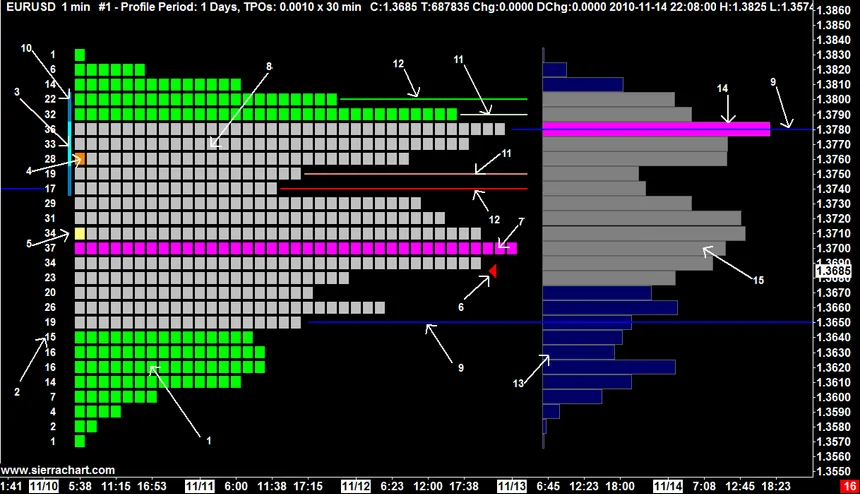
Market Profile, or Time Price Opportunity (TPO), is a powerful tool that visualizes time spent at each price level, revealing auction mechanics and institutional bias. Developed by J. Peter Steidlmayer, it uses letter blocks to show development over time, highlighting value areas where 70% of activity occurred.
TPO Shapes
- P-Shape: Bullish, wide at top (long liquidation).
- D-Shape: Bearish, wide at bottom (short liquidation).
- B-Shape: Balanced, rotational day.
Official TPO guide: https://gocharting.com/docs/charting/technical-indicator/orderflow/market-profile-aka-tpo-charts
Beginner Level: TPO Profile Basics and Key Levels
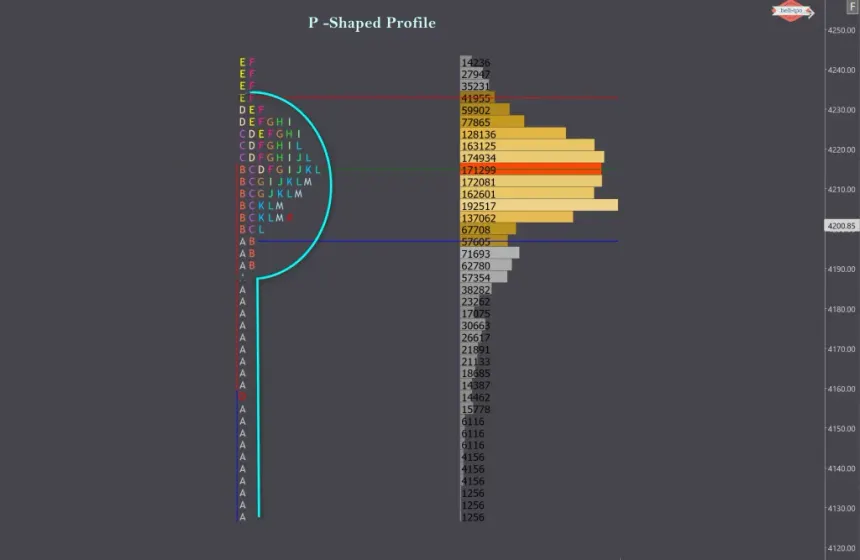
TPO Essentials
- POC (Point of Control): Highest TPO row, acting as a price magnet.
- Value Area (VA): 70% of session's TPO, bounded by VAH (high) and VAL (low).
Basic Interpretation
- Price above VA: Bullish acceptance.
- Price below VA: Bearish rejection.
Pro Tip for Beginners
Use session-based TPO on TradingView or ATAS to identify daily bias.
Intermediate Level: TPO Shapes and Value Migration
TPO Shapes Analysis
- P-Shape: Bullish conviction, expect upside continuation.
- D-Shape: Bearish conviction, favoring downsides.
- B-Shape: Range-bound, trade fades.
Value Migration
- POC shifts upward: Bullish rotation.
- Downward migration: Bearish.
Intermediate Strategies
- Trade breaks of VAH/VAL with volume confirmation.
- Monitor single prints: Gaps in TPO indicating weak areas.
Advanced Level: Initial Balance, Composites, and Confluence
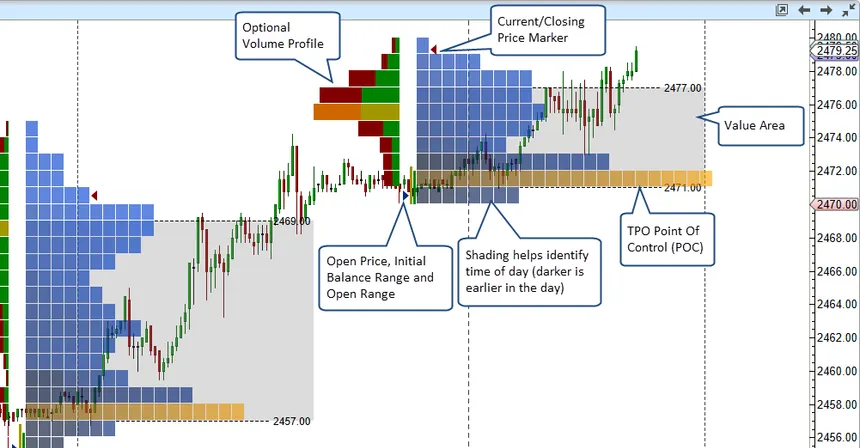
Advanced Features
- Initial Balance (IB): First hour's range, expansions signal trend days.
- Composite Profiles: Merge multiple sessions for longer-term value.
Confluence Strategies
- TPO POC + VWAP alignment = strong support.
- P-Shape + footprint absorption = bullish reversal.
Expert Workflow: Settings, Optimization, and Risk Management
Expert Settings in TradingView/ATAS
- Block Size: 30 min for standard TPO.
- Enable VA (70%), POC, single prints, IB.
Pro Workflow
- Pre-Market: Review prior TPO for value areas.
- Intraday: Trade VA breaks or POC retests.
- Post-Market: Analyze composites.
Risk Management
- Stops: Beyond VA extremes.
- Sizing: Increase at multi-confluence.
Optimization
- Backtest shape-based strategies; integrate with liquidations for SFP.
Conclusion & Next Steps
TPO unlocks auction insights, complementing order flow for institutional trading.
Key Resources
- GoCharting TPO Guide: https://gocharting.com/docs/charting/technical-indicator/orderflow/market-profile-aka-tpo-charts
- TradingView TPO Indicator: https://www.tradingview.com/support/solutions/43000713306-time-price-opportunity-tpo-indicator/
- ATAS Market Profile: https://atas.net/blog/market-profile/
Further Reading & Resources